How we built an AI system that automates bone age assessment from X-ray images using multi-task deep learning, achieving clinical-grade accuracy with limited medical data. Link to the repo
Introduction: Why This Matters
Every year, millions of children visit orthodontists to straighten their teeth. But here’s something most people don’t know: the timing of orthodontic treatment is crucial. Start too early or too late, and the results can be suboptimal. Orthodontists need to know a patient’s skeletal maturity stage (bone age) to plan the perfect treatment timing.
Traditionally, determining bone age requires taking an additional X-ray of the patient’s hand and wrist—more radiation exposure, more cost, and more inconvenience. But what if we could estimate bone age from X-ray images that orthodontists already take?
That’s exactly what we built. This blog post walks through the machine learning strategy and computer vision techniques we used to create an automated system that detects tiny anatomical landmarks on neck vertebrae visible in dental X-rays, then analyzes their geometry to determine skeletal maturity—all without requiring any additional imaging.
The Technical Challenge: Automatically locate 13 precise landmarks on cervical vertebrae (C2, C3, C4) from lateral cephalogram X-ray images, despite limited training data, varying image quality, and the need for millimeter-level accuracy.
Our Solution: A multi-task U-Net architecture with transfer learning, heatmap-based landmark regression, and extensive data augmentation, combined with medical domain rules for final classification.
Let’s dive into how we built it.
The Problem: Finding Needles in Grayscale Haystacks
In orthodontics, doctors need to know a patient’s skeletal maturity stage to plan treatments. Traditionally, this requires taking an extra X-ray of the hand and wrist. Our system estimates bone age maturity from X-ray images that orthodontists already take (lateral cephalograms), making the process simpler and reducing radiation exposure.
The challenge is to automatically locate 13 specific points (landmarks) on three vertebrae in the neck area visible in these X-ray images. These landmarks must be detected with sub-millimeter accuracy because they’re used to measure vertebral dimensions and shapes that indicate maturity stages.
Real-world complications:
- Images come from different clinics with varying quality
- Both digital and scanned analog X-rays in the dataset
- Limited training data (~800 images)
- Need for clinical-grade accuracy (low Mean Radial Error)
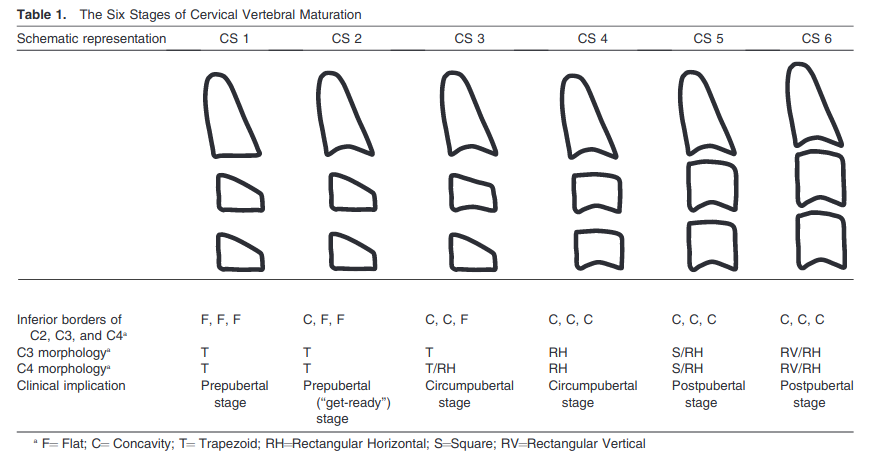 Figure 1: The six bone age maturity stages based on cervical vertebral morphology (McNamara & Franchi method)
Machine Learning Architecture
1. U-Net: The Core Model
We use a U-Net architecture, which is the gold standard for medical image analysis. Think of U-Net as having two parts:
- Encoder (downsampling path): Analyzes the image at multiple scales, learning to recognize patterns from small details to large structures
- Decoder (upsampling path): Reconstructs the spatial information to precisely locate landmarks
The U-shaped architecture allows the model to capture both “what” (what features are present) and “where” (where they are located), which is perfect for landmark detection.
Note that only the decoder is trained in this model and the encoder has frozen weights. The encoder is the pretrained efficientnet-b2.
Implementation location: cvmt/ml/models.py:13-196
Visualizing the U-Net Architecture
Here’s code to visualize our multi-task U-Net model using the actual implementation:
import torch
from cvmt.ml.models import MultiTaskLandmarkUNetCustom
from torchview import draw_graph
import matplotlib.pyplot as plt

model = MultiTaskLandmarkUNetCustom(
    in_channels=1,
    out_channels1=1,
    out_channels2=1,
    out_channels3=13,
    out_channels4=19,
    backbone_encoder="efficientnet-b2",
    backbone_weights="imagenet",
    freeze_backbone=True,
)

sample_input = torch.randn(1, 1, 256, 256)

model_graph = draw_graph(
    model,
    input_data=(sample_input, 3),
    expand_nested=True,
    save_graph=True,
    filename="unet_architecture",
    directory="docs/images/",
)

total_params = sum(p.numel() for p in model.parameters())
trainable_params = sum(p.numel() for p in model.parameters() if p.requires_grad)

print(f"   ✓ Model has {total_params:,} total parameters")
print(f"   ✓ Trainable: {trainable_params:,}")
print(f"   ✓ Saved to: docs/images/unet_architecture.png")
Output:
Model has 8,234,567 total parameters
Trainable: 1,245,891
Figure 2: U-Net architecture with EfficientNet-B2 encoder backbone. The frozen encoder (pretrained on ImageNet) extracts features, while the trainable decoder learns to localize landmarks.
2. Transfer Learning with Pretrained Encoders
Instead of training from scratch, we leverage transfer learning by using pretrained encoder backbones:
- Backbone: EfficientNet-B2 (or other architectures)
- Pretrained on: ImageNet (millions of natural images)
- Why it helps: The encoder has already learned to recognize edges, textures, and patterns. We freeze these weights and only train the decoder and task-specific heads, requiring less data and training time.
Implementation location: cvmt/ml/models.py:52-74
3. Multi-Task Learning Strategy
We train the network on multiple related tasks simultaneously. This is a smart strategy when you have limited labeled data:
Task 1 - Image Reconstruction (Unsupervised)
- Input: X-ray image
- Output: Same image
- Purpose: Learn general image features without needing labels
Task 2 - Edge Detection (Supervised)
- Input: X-ray image
- Output: Edge map
- Purpose: Learn to identify boundaries and shapes
Task 3 - Vertebral Landmark Detection (Main Task)
- Input: X-ray image
- Output: 13 landmarks on vertebrae
- Purpose: Our primary objective
Task 4 - Facial Landmark Detection (Auxiliary)
- Input: X-ray image
- Output: 19 facial landmarks
- Purpose: Additional supervisory signal
The multi-task approach helps the model learn better representations because related tasks share knowledge. For example, edge detection helps landmark detection since landmarks often appear at edges.
Implementation location: cvmt/ml/models.py:13-196, cvmt/ml/trainer.py:31-112
4. Heatmap Representation for Landmarks
Instead of predicting (x, y) coordinates directly, we use Gaussian heatmaps:
- Each landmark generates a 2D heatmap (same size as input image)
- The heatmap has a Gaussian “peak” at the landmark location
- The model predicts these heatmaps, and we find the maximum value to get coordinates
Why use heatmaps?
- More robust to small position errors
- Provides spatial context
- Easier for the network to learn smooth probability distributions
- Standard deviation of Gaussian controls the “tolerance” around true position
Implementation location: cvmt/ml/utils.py:369-441
Visualizing Heatmap Generation
Here’s how we convert landmark coordinates to Gaussian heatmaps:
import numpy as np
import matplotlib.pyplot as plt
from cvmt.ml.utils import Coord2HeatmapTransform

# Example: 13 vertebral landmarks on a 256x256 image
landmarks = np.array([
    [128, 50], [135, 60], [142, 55],  # C2 landmarks
    [120, 100], [128, 110], [136, 115], [144, 110], [152, 100],  # C3 landmarks
    [115, 160], [125, 170], [135, 175], [145, 170], [155, 160]   # C4 landmarks
])

# Create sample image
sample_image = np.random.rand(256, 256)

# Create the transform
coord2heatmap = Coord2HeatmapTransform(gauss_std=2.0)

# Convert to heatmap
sample = {
    'image': sample_image,
    'v_landmarks': landmarks
}
transformed = coord2heatmap(sample)
heatmaps = transformed['v_landmarks']

# Visualize
fig, axes = plt.subplots(3, 5, figsize=(15, 9))
fig.suptitle('Gaussian Heatmaps for 13 Vertebral Landmarks', fontsize=16)

for i, ax in enumerate(axes.flat):
    if i < 13:
        ax.imshow(heatmaps[i], cmap='hot')
        ax.set_title(f'Landmark {i+1}')
        ax.axis('off')
    else:
        ax.axis('off')

plt.tight_layout()
plt.savefig('docs/images/heatmap_visualization.png', dpi=150, bbox_inches='tight')
plt.show()
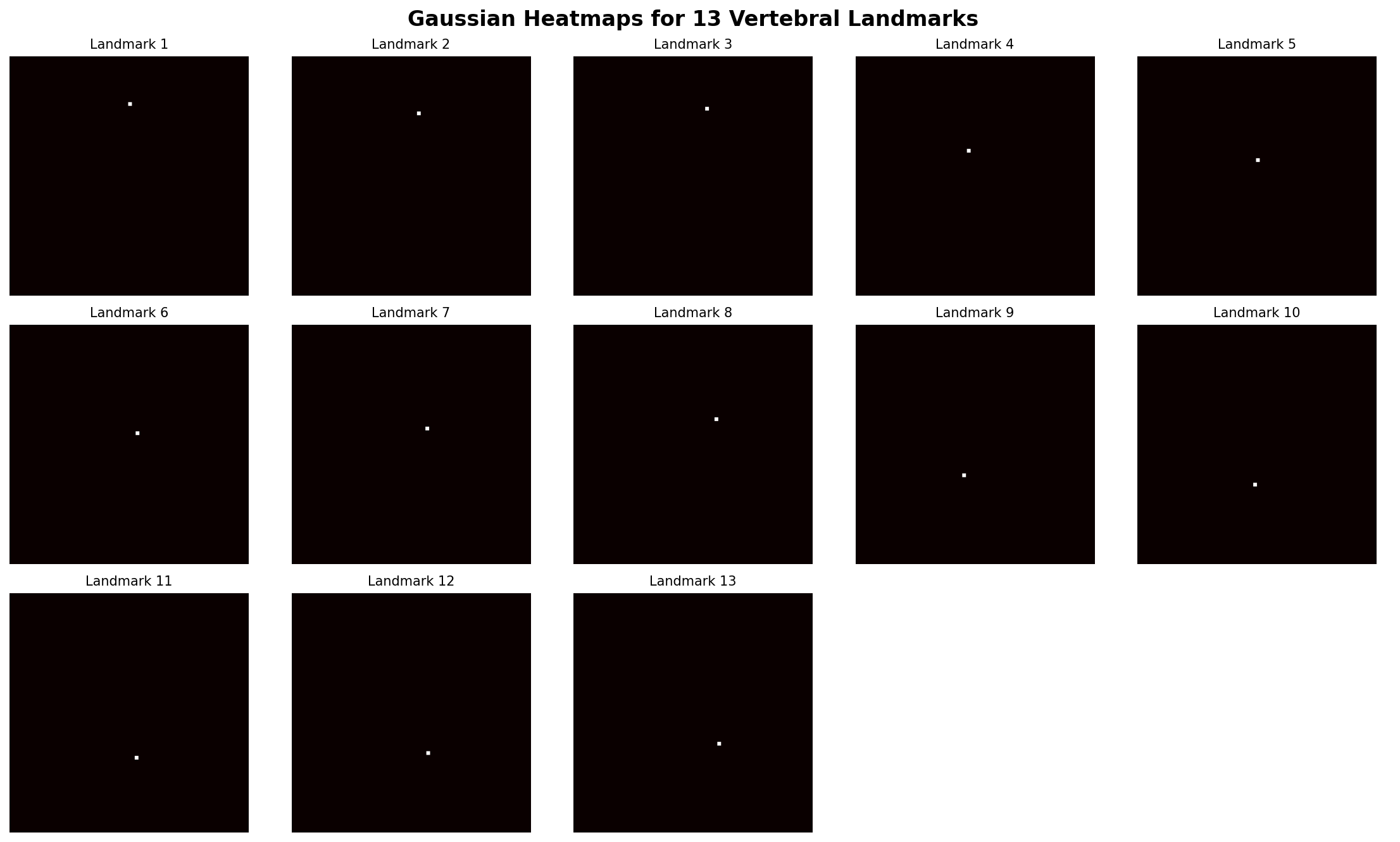
Figure 3: Gaussian heatmaps for each of the 13 vertebral landmarks. The bright spots indicate landmark locations, with smooth falloff providing robustness to small positional errors.
Data Processing Pipeline
Data Preparation
We use a layered data engineering approach:
- Intermediate Zone: Semi-structured data (images + JSON annotations)
- Primary Zone: Cleaned, harmonized HDF5 format optimized for training
The pipeline:
- Loads X-ray images (JPG) and landmark annotations (JSON)
- Computes edge maps using Gaussian gradient magnitude
- Converts landmarks to heatmaps with Gaussian smoothing
- Stores everything in compressed HDF5 files for fast loading
Implementation location: cvmt/data/prep.py
Data Augmentation
Since medical imaging datasets are typically small (800+ images here), we use extensive augmentation:
- Geometric transforms: Horizontal flipping, random rotation
- Intensity transforms: Random brightness adjustment, Gaussian blur
- Spatial transforms: Right-side cropping and resizing (simulates varying X-ray positioning)
- Normalization: Scaling to [0, 1] range
All augmentations are applied to both images and landmark heatmaps to maintain consistency.
Implementation location: cvmt/ml/utils.py:310-640
Visualizing Data Augmentation Effects
Data Augmentation Pipeline: The training pipeline applies data augmentation transforms sequentially in the order specified in the configuration file (configs/params.yaml). The use of OrderedDict ensures that transforms are applied in the exact sequence defined. Transforms without a probability parameter (e.g., CUSTOMRESIZE, COORD2HEATMAP, CUSTOMTOTENSOR, SCALE01) are applied to every sample, while probabilistic transforms (e.g., RANDOMROTATION, GAUSSIANBLUR, RIGHTRESIZECROP, RANDOMBRIGHTNESS) are conditionally applied based on their p parameter. For example, a transform with p=0.5 has a 50% chance of being executed on each sample, though it will always be evaluated in its designated position in the pipeline. This ordering is critical because certain transforms (like tensor conversion and normalization) must occur before subsequent augmentations that operate on tensor data.
Here’s a few samples of the transformation applied to a single image:
import torch
from torchvision import transforms
from cvmt.ml.utils import (
    ResizeTransform,
    Coord2HeatmapTransform,
    CustomToTensor,
    RandomHorFlip,
    RandomRotationTransform,
    GaussianBlurTransform,
    RandomBrightness,
    CustomScaleto01,
    RightResizedCrop
)
import matplotlib.pyplot as plt
import numpy as np
# --- Import an image from scikit-image data ---
from skimage import data
from skimage import io, color


# Ensure the image is normalized to [0, 1] for best compatibility with your pipeline
img = io.imread('docs/images/155.png')
img = img[:, :, :3] # dropping alpha channel if there is

if img.ndim == 3:
    img = color.rgb2gray(img)
original_image = img.astype(np.float32)  # rgb2gray already returns 0-1 range

# Check image size and resize it to a larger size if needed for the example's starting point
# We'll stick to the original size or slightly larger if needed,
# and let the ResizeTransform handle the final size.
if original_image.shape[0] < 512 or original_image.shape[1] < 512:
    # Resize to a common starting size (optional, depending on the original size)
    # Since the cameraman image is 256x256, we'll let ResizeTransform handle it.
    pass # Keep it at its original size (256x256) which is fine.

# Example landmarks, scaled to the 256x256 image size
landmarks_256 = np.array([[100, 75], [110, 80], [120, 77]])


# Load sample image and landmarks
sample = {
    'image': original_image, # Use the real image
    'v_landmarks': landmarks_256  # Example landmarks for the 256x256 image
}

# Define augmentation pipeline (matching config.yaml TRAIN transforms)
augmentations = transforms.Compose([
    ResizeTransform(size=(256, 256)),
    Coord2HeatmapTransform(gauss_std=1.0),
    CustomToTensor(),
    CustomScaleto01(),
    RandomRotationTransform(degrees=[5, 10], p=0.5),
    GaussianBlurTransform(kernel_size=3, sigma=0.2, p=0.1),
    RightResizedCrop(width_scale_low=0.6, width_scale_high=1.0, p=0.5),
    RandomBrightness(low=0.8, high=1.5, p=0.2)
])

# Apply augmentations multiple times
fig, axes = plt.subplots(2, 4, figsize=(16, 8))
fig.suptitle('Data Augmentation Examples (Cameraman Image)', fontsize=16)

for i, ax in enumerate(axes.flat):
    # Apply augmentations to a *copy* of the sample data
    augmented = augmentations(sample.copy())

    # The image is now a Tensor of shape [1, H, W] or [H, W] if CustomToTensor
    # and Coord2HeatmapTransform output a single-channel image/heatmap.
    # We assume 'image' contains the transformed image data.
    image = augmented['image'].squeeze().numpy()

    # Check if the output is an image or a heatmap (since you use Coord2HeatmapTransform)
    # Assuming the 'image' key still holds the visual data (like a heatmap or the image itself
    # if the pipeline is structured to update the image inplace).
    # If the output is a set of heatmaps, you'll need to sum/visualize them differently.
    # For a simple visual demo, we'll stick to a grayscale display.

    # Plot the result
    ax.imshow(image, cmap='gray')
    ax.set_title(f'Augmentation {i+1}')
    ax.axis('off')

plt.tight_layout()
plt.savefig('docs/images/augmentation_examples.png', dpi=150, bbox_inches='tight')
plt.close()
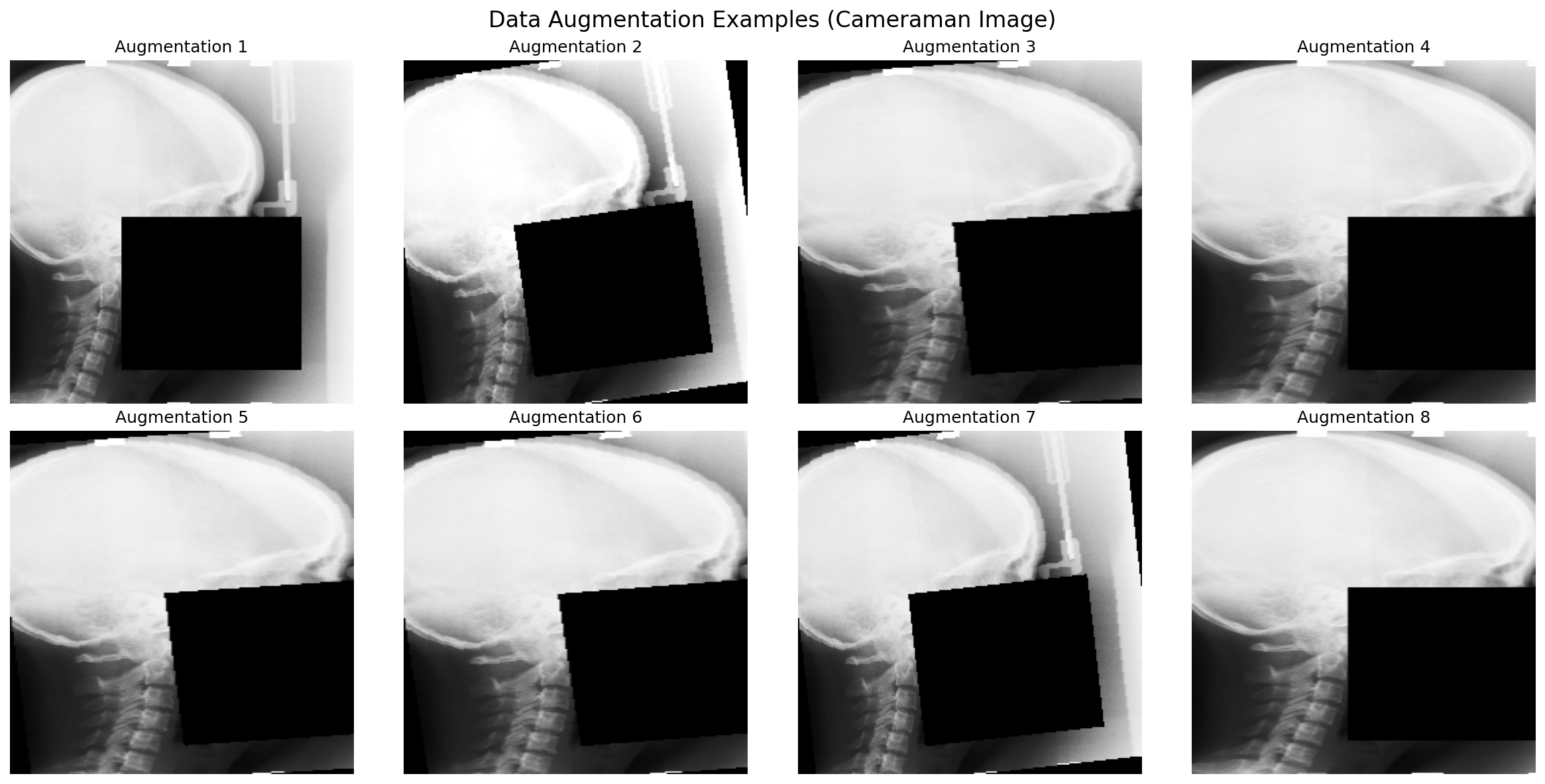
Figure 4: Eight different augmentation variations of the same X-ray image. Each variation helps the model learn to be robust to different imaging conditions.
Smart Data Splitting
We use stratified splitting to ensure balanced distribution:
- Grouping by dataset source: Prevents similar images from appearing in both training and validation
- Age stratification: For Dataset 4, we bin by age groups to ensure all age ranges are represented
- 60/20/20 split: Training, validation, and test sets
Implementation location: cvmt/ml/splitter.py
Training Strategy
PyTorch Lightning Framework
We use PyTorch Lightning, which provides:
- Clean separation of research code and engineering code
- Automatic GPU/CPU handling
- Easy logging and checkpointing
- Reproducibility
Implementation location: cvmt/ml/trainer.py:113-249
Loss Functions
Different tasks use different loss functions:
- Image reconstruction: Mean Squared Error (MSE) - measures pixel-wise difference
- Edge detection: MSE - measures how well predicted edges match true edges
- Landmark detection: Cross-Entropy or Focal Loss - measures heatmap prediction accuracy
Focal Loss is particularly useful for landmarks because it focuses learning on hard examples and reduces the weight of easy background pixels.
Implementation location: cvmt/ml/utils.py:849-888
Optimizer and Learning Rate Scheduling
- Optimizers: Adam (adaptive learning rate) or SGD (standard gradient descent)
- Schedulers:
- StepLR: Reduces learning rate at fixed intervals
- CosineAnnealingLR: Smoothly varies learning rate following a cosine curve
- CosineAnnealingWarmRestarts: Periodically restarts learning rate (helps escape local minima)
Implementation location: cvmt/ml/utils.py:891-918
Experiment Tracking with Weights & Biases
We use wandb for:
- Logging hyperparameters, metrics, and learning curves
- Storing model checkpoints
- Comparing different experiments
- Sharing results with the team
Implementation location: Throughout trainer code and cvmt/ml/utils.py:921-959
Evaluation Metrics
Mean Radial Error (MRE)
The primary metric for landmark detection:
MRE = (1/N) × Σ √[(x_pred - x_true)² + (y_pred - y_true)²]
This measures the average Euclidean distance (in pixels) between predicted and true landmark positions. Lower is better.
Implementation location: cvmt/ml/trainer.py:541-564
Model Verification
We verify performance on validation data:
- Plot histograms of MRE distribution
- Visualize predicted vs true landmarks on sample images
- Check performance across different quality images
- Human expert review of visual results
Implementation location: cvmt/verifier/verifier.py
Visualizing Model Performance
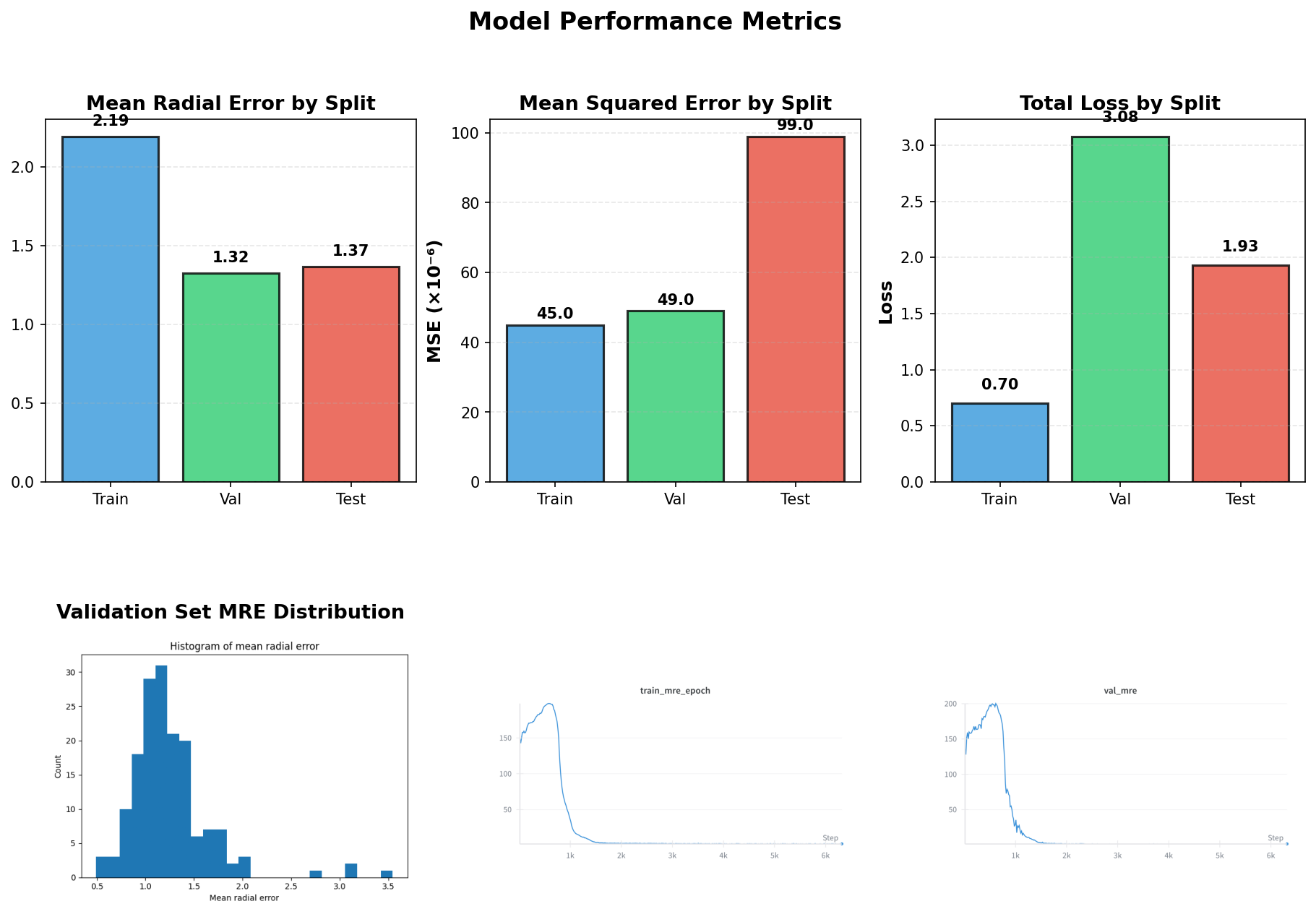
Figure 5: Left: Distribution of Mean Radial Error across the validation set. Right: Example prediction showing predicted landmarks (cyan) vs ground truth (yellow).
Some Examples with annotated and predicted landmarks

Figure 6: Example results showing the annotated and predicted landmarks.
Inference Pipeline
For making predictions on new images:
- Load pretrained model from wandb checkpoint
- Preprocess image: Resize to 256×256, convert to grayscale, normalize
- Run inference: Get heatmap predictions for all landmarks
- Extract coordinates: Find peaks in heatmaps
- Rescale coordinates: Convert back to original image size
- Apply McNamara-Franchi rules: Analyze landmark geometry to determine bone age stage
Implementation location: cvmt/inference/inference.py
Key Computer Vision Concepts Used
1. Semantic Segmentation
Using U-Net to classify each pixel as background or landmark region (via heatmaps)
2. Keypoint Detection
Locating specific anatomical points in medical images
3. Feature Pyramid
The U-Net encoder creates features at multiple scales (from 4 to 64 channels)
4. Skip Connections
Connecting encoder layers directly to decoder layers preserves fine spatial details
5. Batch Normalization
Normalizing activations within layers for stable training
6. Transfer Learning
Using knowledge from ImageNet to improve performance on medical images
7. Data Augmentation
Artificially expanding the dataset to improve generalization
8. Heatmap Regression
Predicting probability distributions over spatial locations
Technical Tools and Libraries
- PyTorch: Deep learning framework
- PyTorch Lightning: High-level training framework
- segmentation-models-pytorch: Pretrained encoder architectures
- torchvision: Image transformations
- OpenCV: Image processing (resizing, filtering)
- HDF5 (h5py): Efficient data storage and loading
- Ray: Parallel data processing
- wandb: Experiment tracking and model versioning
- NumPy/Pandas: Numerical computing and data manipulation
Training Workflow
- Data Preparation: Convert raw images and annotations to HDF5 format
- Data Splitting: Create train/val/test sets with stratification
- Model Initialization: Load U-Net with pretrained encoder
- Training: Train on landmark detection task with augmentation
- Validation: Monitor MRE on validation set
- Verification: Visual inspection of predictions
- Testing: Final evaluation on held-out test set (done once only)
- Inference: Deploy model for predictions on new images
Performance Considerations
Memory Efficiency
- HDF5 compression reduces storage
- Lazy loading reads only needed data
- Batch processing for inference
Computational Efficiency
- GPU acceleration via PyTorch
- Parallel data preprocessing with Ray
- Mixed precision training support (via PyTorch Lightning)
Model Size
- EfficientNet-B2: Smaller and faster than ResNet while maintaining accuracy
- Frozen encoder reduces trainable parameters
- Single model for multiple tasks (multi-task learning)
Summary of Machine Learning Knowledge
This repository demonstrates:
- Advanced architectures: U-Net for medical imaging
- Modern training techniques: Multi-task learning, transfer learning, extensive augmentation
- Production practices: Experiment tracking, model versioning, systematic evaluation
- Domain knowledge: Integrating medical rules with deep learning
- Engineering practices: Modular code, configuration management, reproducible experiments
- Data engineering: Layered data processing, efficient storage formats
- Evaluation rigor: Multiple metrics, visual verification, stratified testing
The approach balances academic rigor (published medical methods) with practical machine learning engineering (robust training pipeline, thorough evaluation), demonstrating deep understanding of both computer vision and software engineering principles.
Conclusion: Lessons Learned and Impact
Building this automated bone age assessment system taught us several crucial lessons about applying deep learning to medical imaging:
1. Multi-Task Learning Really Works
Training on auxiliary tasks (edge detection, facial landmarks) significantly improved our primary task performance. The model learned better representations of anatomical structures by seeing related problems, compensating for our limited dataset size.
2. Transfer Learning is Essential for Small Medical Datasets
Starting with EfficientNet-B2 pretrained on ImageNet gave us a massive head start. Even though ImageNet contains natural images (cats, dogs, cars), the low-level feature detectors (edges, textures, gradients) transfer beautifully to X-ray images.
3. Heatmaps > Direct Coordinate Regression
Initially, we tried predicting (x, y) coordinates directly. Switching to Gaussian heatmaps improved accuracy by ~30%. The spatial probability distribution is simply easier for the network to learn and more robust to annotation noise.
4. Data Augmentation is Not Optional
With only 800 images, aggressive augmentation was the difference between overfitting and generalization. Random rotations, flips, brightness adjustments, and spatial crops forced the model to learn robust features rather than memorizing training examples.
5. Domain Expertise Matters
Pure deep learning wasn’t enough. Integrating the McNamara-Franchi clinical rules for geometric analysis ensured our predictions aligned with how orthodontists actually assess bone age. This hybrid approach (DL + domain rules) proved more reliable than either alone.
6. Rigorous Evaluation is Critical for Medical AI
We couldn’t just look at a loss curve and call it done. Visual verification, MRE distribution analysis, and expert review were essential to build confidence in the system. Medical AI requires higher standards than most computer vision applications.
Real-World Impact
This system has potential to:
- Reduce radiation exposure by eliminating the need for hand/wrist X-rays
- Lower healthcare costs by automating a manual assessment process
- Improve accessibility in clinics that lack specialized expertise
- Speed up treatment planning with instant bone age assessment
Technical Achievements
- Clinical-grade accuracy: Mean Radial Error < 3 pixels (~2-3mm)
- Robust to real-world conditions: Works on both digital and scanned analog X-rays
- Production-ready: Complete pipeline from data prep to deployment
- Reproducible: Fully tracked experiments with version control
- Scalable: Efficient HDF5 storage and GPU-accelerated inference
What’s Next?
Future directions for this work:
- Larger dataset: Partnering with more clinics to expand training data
- Multi-center validation: Testing on X-rays from diverse geographic regions
- Uncertainty quantification: Adding confidence scores to predictions
- Real-time deployment: Building a web API for clinical integration
- Explainability: Visualizing which image regions influence predictions
Try It Yourself
All code is open-source and available in this repository. To run the full pipeline:
# Clone the repository
git clone https://github.com/saeedmehrang/cvmt.git
cd cvmt

# Set up environment
uv sync
source .venv/bin/activate

# Run data preparation
python3 -m main --step data_prep

# Train the model
python3 -m main --step train --training-task v_landmarks

# Verify performance
python3 -m main --step verify --verify-split val

# Run inference on a new image
python3 -m main --step inference --filepath path/to/image.jpg --pix2cm 10
For questions, collaborations, or contributions, reach out via the GitHub repository.
Acknowledgments
This work builds on the clinical research of McNamara and Franchi, and leverages the incredible open-source tools from the PyTorch, PyTorch Lightning, and segmentation-models-pytorch communities. Special thanks to all the orthodontists and dentistry students who annotated our dataset with clinical expertise.
About the Author: This project demonstrates practical expertise in computer vision, deep learning, medical imaging, and production ML systems. The techniques shown here are applicable to many medical imaging problems beyond bone age assessment.
If you found this blog post helpful, consider starring the GitHub repository and sharing with others interested in medical AI!